
Manal Saleh
New Smart Switch capabilities in
collaboration with Google mean users’ full digital lives can easily move across
from Android and iOS devices to the new Galaxy Z series.
Switching to Galaxy has never been easier. New switching
capabilities in collaboration with Google expand what Smart Switch can move
from an iOS device, so years of photos, messages, logins and settings arrive on
new Galaxy devices, including the Galaxy Z Fold8 Ultra, Fold8 and Flip8, in a
single, seamless move. Smart Switch handles the move wirelessly, with no cable
and no third-party tools, so nothing that matters gets left behind. With these
upgrades, users can move to the Galaxy Z8 series in a few taps, with all their
data intact.
Switching to Galaxy is built to be simple. Smart Switch is how
you bring your data with you, whether you are coming from an older Galaxy, an
iOS device, or another Android phone. A single scan pairs the two devices, with
no app to install on the older one and no third-party software or dongles
needed, with the option to transfer wirelessly, by cable, or from a cloud
backup, all while expanding the list of transferable data to include 17
different types.
What is new is how much further Smart Switch now goes. New
capabilities in collaboration with Google move data types that had no path
across before, including eSIM profiles, passwords and passkeys. In all, 17
categories of data transfer, so your number, your logins and your call history
arrive with everything else, and your new Galaxy feels familiar from the first
moment.
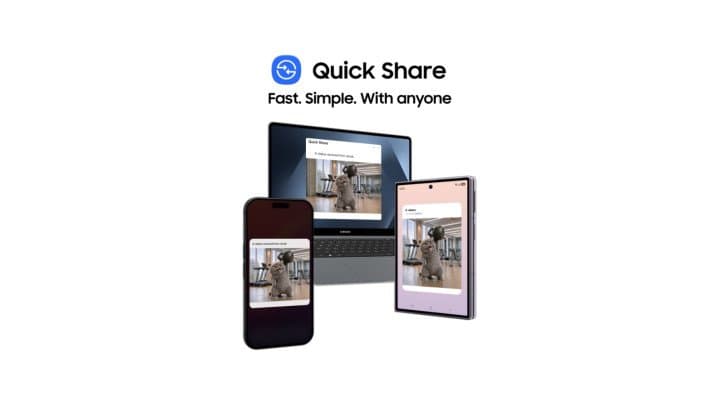
The switch does not end at setup. Quick Share on Galaxy and
other Android devices now instantly shares files with iOS and other platform
users, so photos, videos, documents and more move in both directions between
Galaxy and iOS devices. Built with security at its core and independently
assessed by a third-party security firm, it means sharing with people on other
platforms simply works, one less thing to think about when moving to Galaxy.
Quick Share makes it fast and simple to send anything from large files to
photos and documents across all your devices, from smartphones to PCs and now iOS
devices, so you can share with anyone, instantly.
And if you would rather see it first, Try
Galaxy lets you preview the latest Galaxy
experience on the phone you already own, before you decide to make the move.
“Choosing your next phone should be about what excites you,
not what holds you back,” said Omar Saheb, Vice President Marketing &
Online Business at Samsung Electronics MENA. “Making people feel at home on a
new Galaxy device from day one has always been a priority for us, and these new
capabilities advance that goal in an exciting way. Our close partnership with
Google let us solve this at the platform level rather than around the edges,
and the result makes moving to the new Galaxy Z8 series more seamless and more
complete than ever.”
“Switching phones should feel like upgrading your lifestyle,
not starting over,” said Najeeb Jarrar, Director of Regional Marketing for the
Middle East & Africa at Google. “We know that the things you keep on your
phone - your memories, your connections, and your preferences - are incredibly
personal. By bringing these new transfer capabilities to the platform level,
we’re proud to work alongside Samsung to make the transition beautifully simple
& safe, ensuring your new device feels entirely familiar, instantly.”
The new switching capabilities arrive with One UI 9.0,
starting on the latest Galaxy devices including the Galaxy Z Fold8 Ultra,
Galaxy Z Fold8 and Galaxy Z Flip8, and are becoming available across a growing
range of Galaxy devices. Samsung is among the very first to introduce these
platform-level capabilities prior to any broader expansion, highlighting its
leadership in delivering a seamless, early transition experience. To learn more
about switching to Galaxy, visit Samsung.com.
Availability and timing may vary by market and by device. Some
transfers may require a cable; on-screen instructions will indicate when.
WhatsApp chat history transfers in a separate step after setup; do not reset
the older phone until that transfer is complete. Quick Share ability to share
with iOS devices was achieved through Google’s own implementation of a
compatible protocol and was not developed in collaboration with Apple.
Compatibility is supported only by Google and requires compatible devices that must
be within Bluetooth range.
About
Samsung Electronics Co., Ltd.
Samsung inspires the world and shapes the future
with transformative ideas and technologies. The company is redefining the
worlds of TVs, digital signage, smartphones, wearables, tablets, home
appliances and network systems, as well as memory, system LSI and foundry.
Samsung is also advancing medical imaging technologies, HVAC solutions and
robotics, while creating innovative automotive and audio products through
Harman. With its SmartThings ecosystem, open collaboration with partners, and
integration of AI across its portfolio, Samsung delivers a seamless and
intelligent connected experience. For the latest news, please visit the Samsung
Newsroom at news.samsung.com

-large.jpg)
-large.jpg)




-large.jpg)
كن أول من يشارك رأيه
ابدأ النقاش حول هذه القصة.