
Manal Saleh
Riyadh, KSA – 07 October 2026 - There was a time when
getting serious work done meant opening a laptop, sitting at a desk and staying
there. Today, work happens everywhere: at the kitchen table, between meetings,
on a flight, in a café or even during the commute.
That is where a tablet can make a difference, but only if it
can do more than stream videos and browse the web.
The new HONOR Pad 20 is designed around exactly that
idea. With a large 12.1-inch 3K display, desktop-style productivity features,
AI-powered tools and a 10,100mAh battery, it is built to handle a full day of
work without feeling like you are carrying a laptop around.
A Screen Designed for Long Work Sessions
When your workday involves reading documents, reviewing
presentations, replying to emails and jumping between multiple windows, the
screen becomes your workspace.
The HONOR Pad 20's 12.1-inch 3K display gives you plenty of
room to work, while its 120Hz refresh rate keeps scrolling and switching
between content smooth. For people who spend hours reading or writing, the Paperlike
Edition takes things a step further.
Its matte, anti-glare surface is designed to feel closer to
paper than a traditional tablet screen. HONOR's Full-color Paper Mode also
creates a more paper-like viewing experience, while PaperLike Notes adjusts the
display's tone when writing.
That makes the tablet particularly suited to tasks that
involve a lot of reading, reviewing and note-taking. Add the HONOR Magic-Pencil
4s, and handwritten notes, annotations and quick sketches can become part of
the same workflow.
When Your Tablet Becomes Your Workstation
The biggest productivity shift comes when the HONOR Pad 20
is paired with its Smart Bluetooth Keyboard.
Instead of working within a typical tablet interface, the
device automatically switches to PC mode, bringing familiar desktop elements
such as a taskbar and resizable windows to the screen.
You can keep up to 15 windows open at the same time, resize
them and move between them without constantly closing and reopening apps. Quick
Layout can also remember how you arrange your workspace, so you can return to
your preferred setup without starting over.
For anyone whose workday involves research, writing and
communication at the same time, this can make a tablet feel much closer to a
compact workstation.
Less Time Taking Notes, More Time Acting on Them
Meetings are another area where productivity can quickly
disappear into paperwork.
The HONOR Pad 20's AI Memo is designed to help
throughout the meeting process, from preparing materials beforehand to
providing live prompts during the conversation and organizing notes and action
items afterwards.
It is a small example of where tablets are moving beyond
simply being screens for existing apps. Instead, the device becomes part of the
workflow itself, helping turn a meeting from a collection of notes into
something more structured and actionable.
And when the workday involves multiple devices, HONOR
Connect allows the Pad 20 to work as a second display for Mac, while files can
be shared between compatible HONOR phones and tablets with a single tap.
Productivity That Doesn't Stop at the Desk
A productive device also needs to keep up when you leave the
desk.
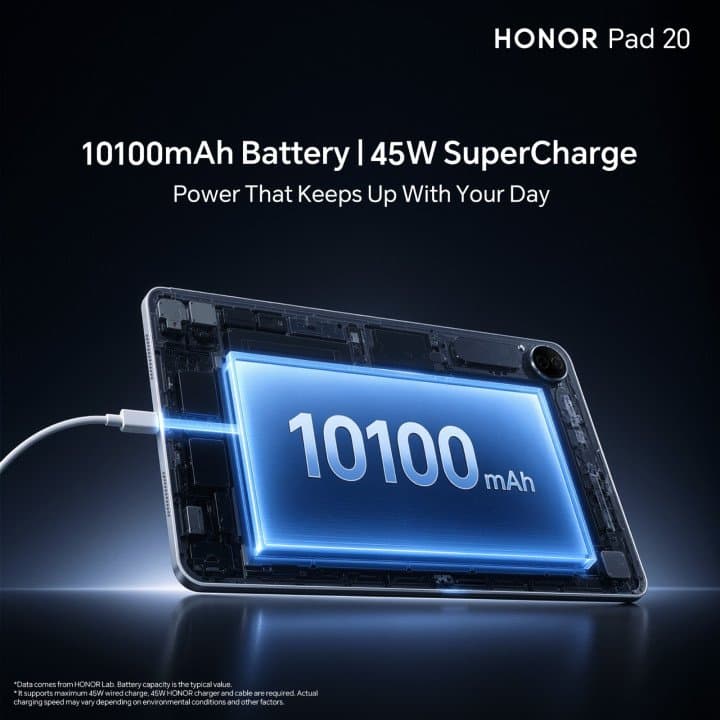
The HONOR Pad 20 packs a 10,100mAh battery, with HONOR
quoting up to 14 hours of e-book reading, around nine hours of video playback
and up to 50 hours of music playback on a single charge.
That matters when the tablet becomes your everyday companion
rather than something that stays on your desk. A morning of emails and
documents can easily turn into an afternoon of presentations and notes,
followed by reading or entertainment on the way home.
The Snapdragon 7 Gen 3 Mobile Platform also brings
improvements in energy efficiency, while the six-speaker system is designed to
deliver balanced stereo sound in both portrait and landscape orientations.
A More Flexible Way to Work
The real appeal of the HONOR Pad 20 is not simply that it
has a big screen, a large battery or desktop-style features. It is that these
elements work together around a more flexible idea of productivity.
You can type when you need to type, write when you need to
write, open multiple windows when your workload gets busy and switch back to a
more relaxed tablet experience when the work is done.





كن أول من يشارك رأيه
ابدأ النقاش حول هذه القصة.