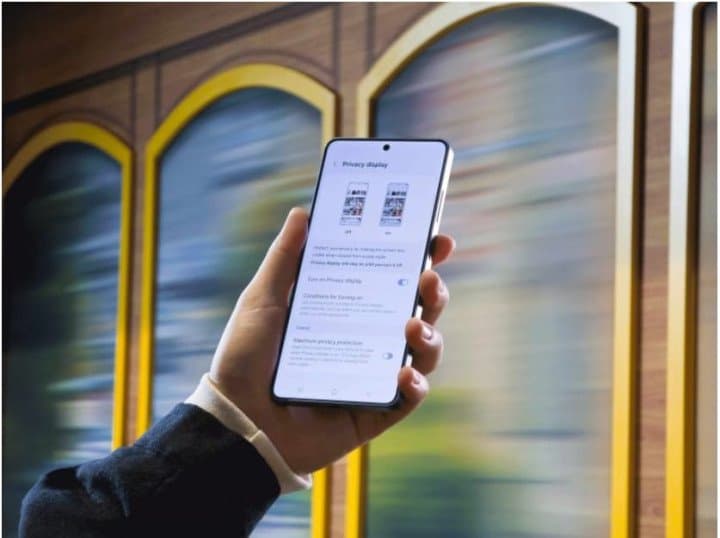
Share on Your Terms with Galaxy S26 Ultra Experience the world’s first smartphone with a built-in privacy display

Manal Saleh
Now you see it, now you don’t. This isn’t some magic trick; you should be in control of what people see on your device. With the industry’s first built-in Privacy Display[1] on Galaxy S26 Ultra, you can decide when you want a clear view from all angles and when you want extra protection from prying eyes.
What is
Privacy Display?
Privacy Display on Galaxy S26 Ultra is a new kind of personal protection built-into the device that allows
you to adjust the visibility of content on your screen. When enabled, visuals
are clear for the user while limiting what others can see when looking at the
screen from the side — perfect when you’re traveling or in other public places.
Unlike aftermarket stick-on privacy screen
covers, the Privacy Display on Galaxy S26 Ultra offers protection without compromising the viewing experience during
everyday use.
How does
Privacy Display work?
Integrated directly into the display hardware,
Privacy Display on Galaxy S26 Ultra controls how the screen’s pixels disperse light, limiting the visibility
from side angles when turned on, while preserving the full display experience
from any direction when it’s off. This hardware-first approach delivers a
clearer and more consistent experience than a traditional privacy screen
protector which permanently reduces brightness and clarity and can degrade
touch responsiveness.
It’s also customizable. You can decide when it
turns on, like when entering sensitive password information, or even limit
visibility for specific types of content like popup notifications — it all
comes down to user choice.
How to Use
Privacy Display on Galaxy S26 Ultra
For step-by-step instructions to turn on
Privacy Display, watch here:
Check out Try Galaxy to test out some of the
latest Galaxy features, including Privacy Display, on the device you’re holding
right now.
Learn more about Galaxy S26 Ultra and all the latest Galaxy devices on Samsung.com.
مواضيع ذات صلة
Nutanix Showcases "One Platform, One Experience" at LEAP Saudi Arabia 2026, Highlighting AI, Hybrid Multicloud and Cloud-Native Innovation
منذ 13 دقيقة . News
.jpeg)
Garmin Opens First Riyadh Store and Launches fēnix 9 Series in Saudi Arabia
منذ يوم . News
Award-Winning Portuguese Chef Ana Magalhães Leads the Culinary Vision at Tabrah, Nujuma, a Ritz-Carlton Reserve
منذ يوم . News
Saudi Wood Expo opens next week at Riyadh Front Exhibition & Conference Center, bringing wood solutions and international expertise from 30 countries
منذ يوم . News
Samsung Galaxy S26 FE: Delivering the Latest Flagship Experience, Focused on What Matters Most
منذ يوم . News
Logitech brings the future of AI-powered workplaces to LEAP 2026
منذ يومين . News
.jpeg)
IFS Brings Industrial AI From Experimentation to Execution at LEAP 2026
منذ يومين . News
webook.com Shares Success of its Global Scale with Esports World Cup Delivery in Paris
منذ يومين . News
Nissan Formula E Team confirms Zane Maloney alongside Oliver Rowland for Season 13
منذ يومين . News